Database Analytics (ClickHouse)
Demonstrates how a product manager can directly ask natural language questions to a ClickHouse database to get LLM usage insights.
Objective
Ask natural language questions about flight operations, delays, and patterns from the ontime dataset, such as:
Example Queries:
- "What is the number of flights per day from the year 2000 to 2008"
- "How many flights delayed by more than 10 minutes, grouped by the day of the week, for 2000-2008"
- "What are the total number of delays"
Behind the Scenes
An AI agent interprets your question, generates optimized ClickHouse SQL, and returns a clean, structured result.
MCP Server Setup: ClickHouse
To connect an AI agent to your ClickHouse database, the following environment variables must be configured:
| Variable | Description |
|---|---|
clickhouse_host | ClickHouse server hostname |
clickhouse_port | ClickHouse server port |
clickhouse_user | ClickHouse username |
clickhouse_password | ClickHouse password |
clickhouse_secure | Whether to use TLS |
clickhouse_verify | Whether to verify TLS certificates |
clickhouse_connect_timeout | Connection timeout (seconds, optional) |
clickhouse_send_receive_timeout | Send/receive timeout (seconds, optional) |
Credentials are securely stored and encrypted. Never share them externally.
Checkout Clickhouse MCP Server: https://app.langdb.ai/mcp-servers/clickhouse
Interaction Flow
How many flights delayed by more than 10 minutes
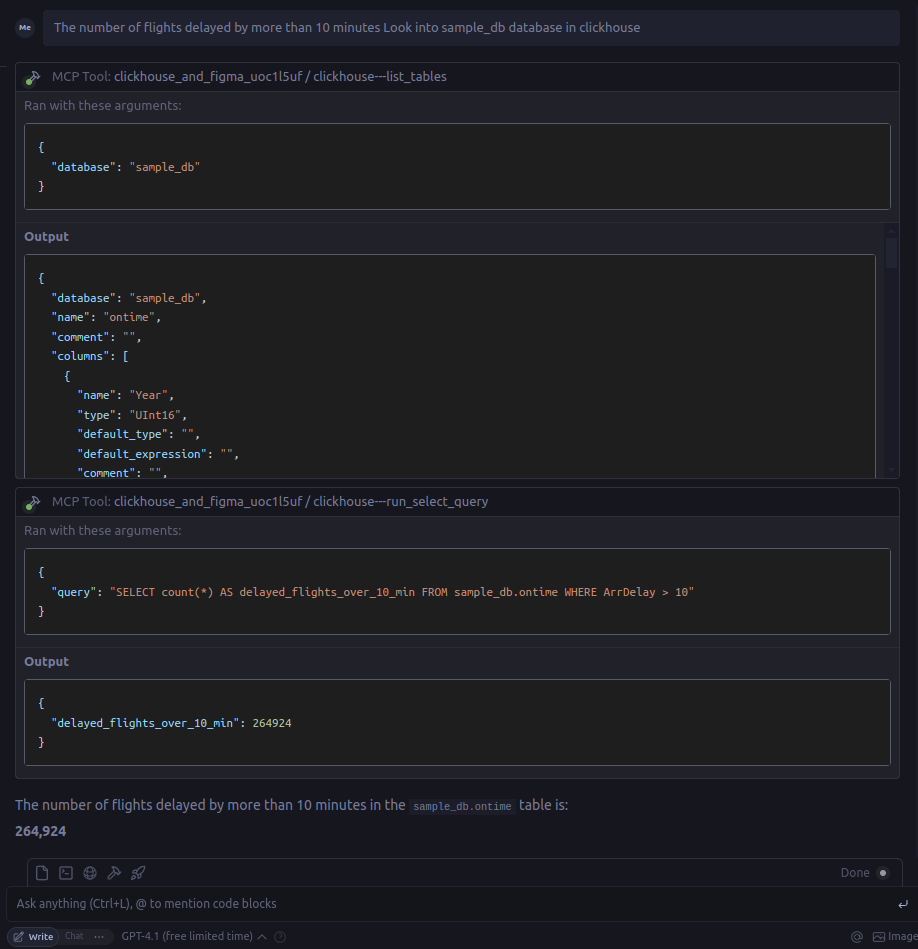
Output
{
  "delayed_flights_over_10_min": 264924
}
Key Takeaways
- Product teams can ask questions directly to the database.
- No SQL writing required — just ask and analyze.
- Enables faster decision-making around usage trends and cost controls.