Personal Knowledgebase with DuckDuckGo + Qdrant
This use case demonstrates how to build a private, self-updating knowledgebase using public web search (DuckDuckGo) and a vector database (Qdrant). By pairing search results with embeddings, you can create a local semantic index for recall, reasoning, or exploration later — all from a single prompt.
This Showcase Demonstrates:
- Querying DuckDuckGo for relevant articles and insights.
- Embedding the content into vector format using an LLM-powered embedding model.
- Storing the semantic vectors into Qdrant for future retrieval via semantic search.
Why It Matters
- Maintain your own always-updating, domain-specific research archive.
- Avoid reliance on vendor-controlled platforms or search engines.
- Enables AI-powered recall and insight generation from public sources.
MCP Server Setup
DuckDuckGo MCP Server
No configuration is required.
- Simply add the DuckDuckGo MCP server.
- Supports direct web search out of the box.
- No authentication or environment variables needed.
Qdrant MCP Server Setup
To store embeddings, Qdrant requires secure credential configuration:
| Variable | Description |
|---|---|
collection_name | Name of the Qdrant collection |
qdrant_url | URL of your Qdrant instance |
qdrant_api_key | API key for authentication |
Checkout MCP Servers:
- DuckDuckGo: https://app.langdb.ai/mcp-servers/duck-duck-mcp
- QDrant: https://app.langdb.ai/mcp-servers/qdrant
Interaction Flow
Search DuckDuckGo for LangDB AI Gateway and embed the articles.
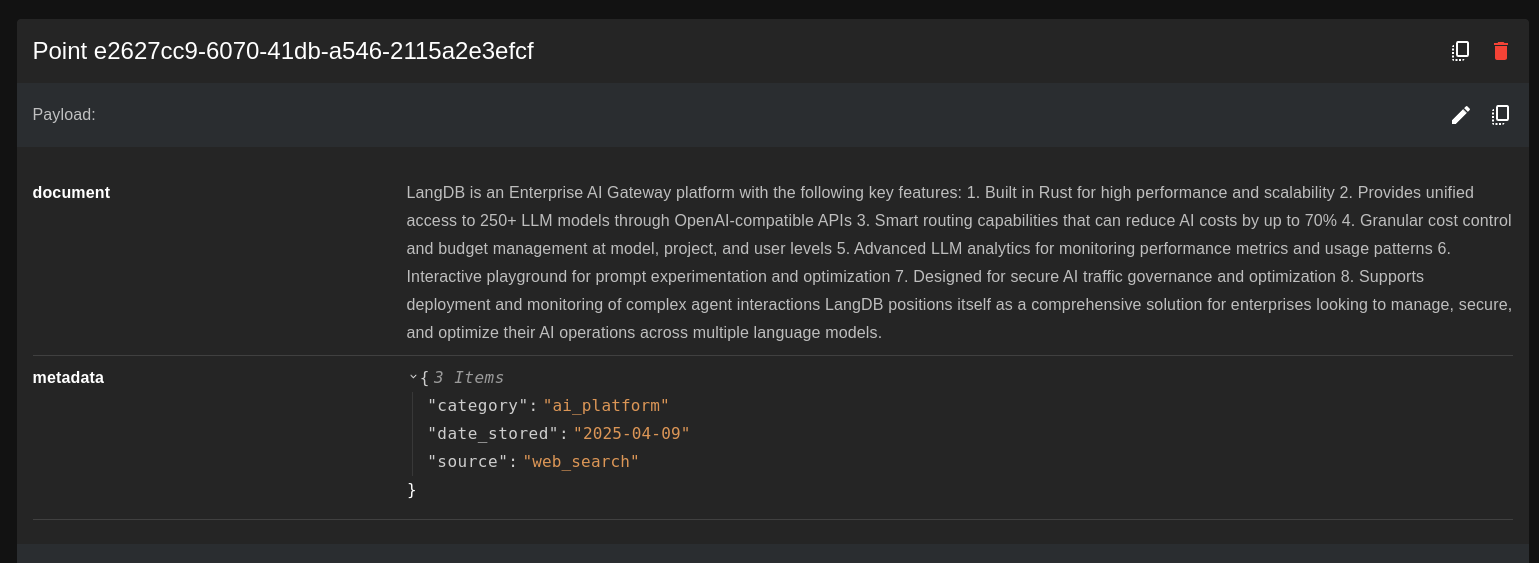
QDrant Output
Benefits
- Own your knowledgebase: No vendor lock-in, no third-party exposure.
- Fast recall: Ask contextual questions and retrieve relevant sources.
- Always current: Update your Qdrant index with new searches as the field evolves.