Auto Router
Stop guessing which model to pick. The Auto Router picks the best one for you—whether you care about cost, speed, or accuracy.
Why Use Auto Router?
- Save Costs - Automatically uses cheaper models for simple queries
- Get Faster Responses - Routes to the fastest model when speed matters
- Guarantee Accuracy - Picks the best model for critical tasks
- Handle Scale - No configuration hell, just works
Quick Start
Using API
{
  "model": "router/auto",
  "messages": [
    {
      "role": "user",
      "content": "What's the capital of France?"
    }
  ]
}
Using UI
You can also try Auto Router through the LangDB dashboard:
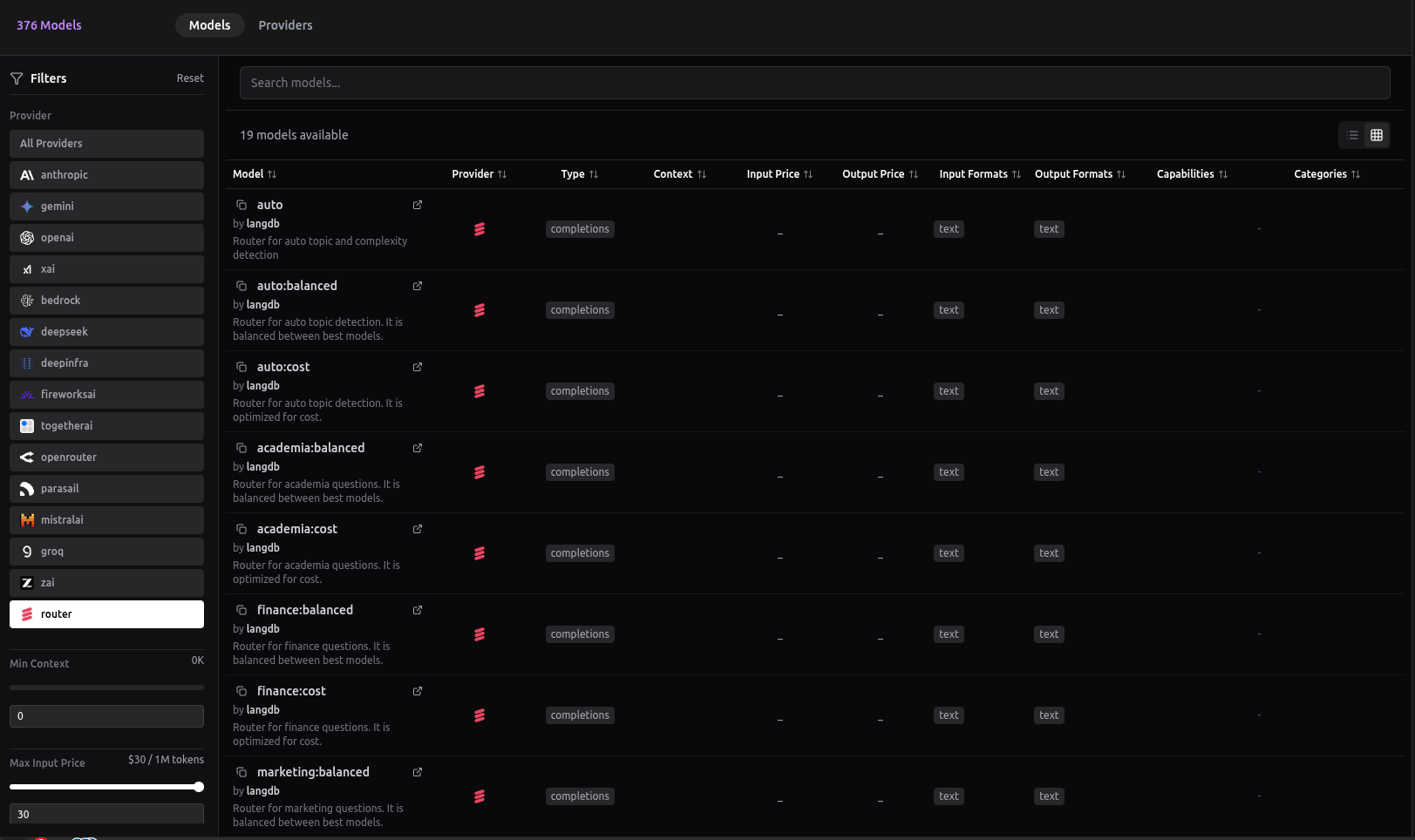
LangDB dashboard showing available Auto Router models and configuration options
Note: The UI shows only a few router variations. For all available options and advanced configurations, use the API.
Trace Example
Here's what happens behind the scenes when you use Auto Router:
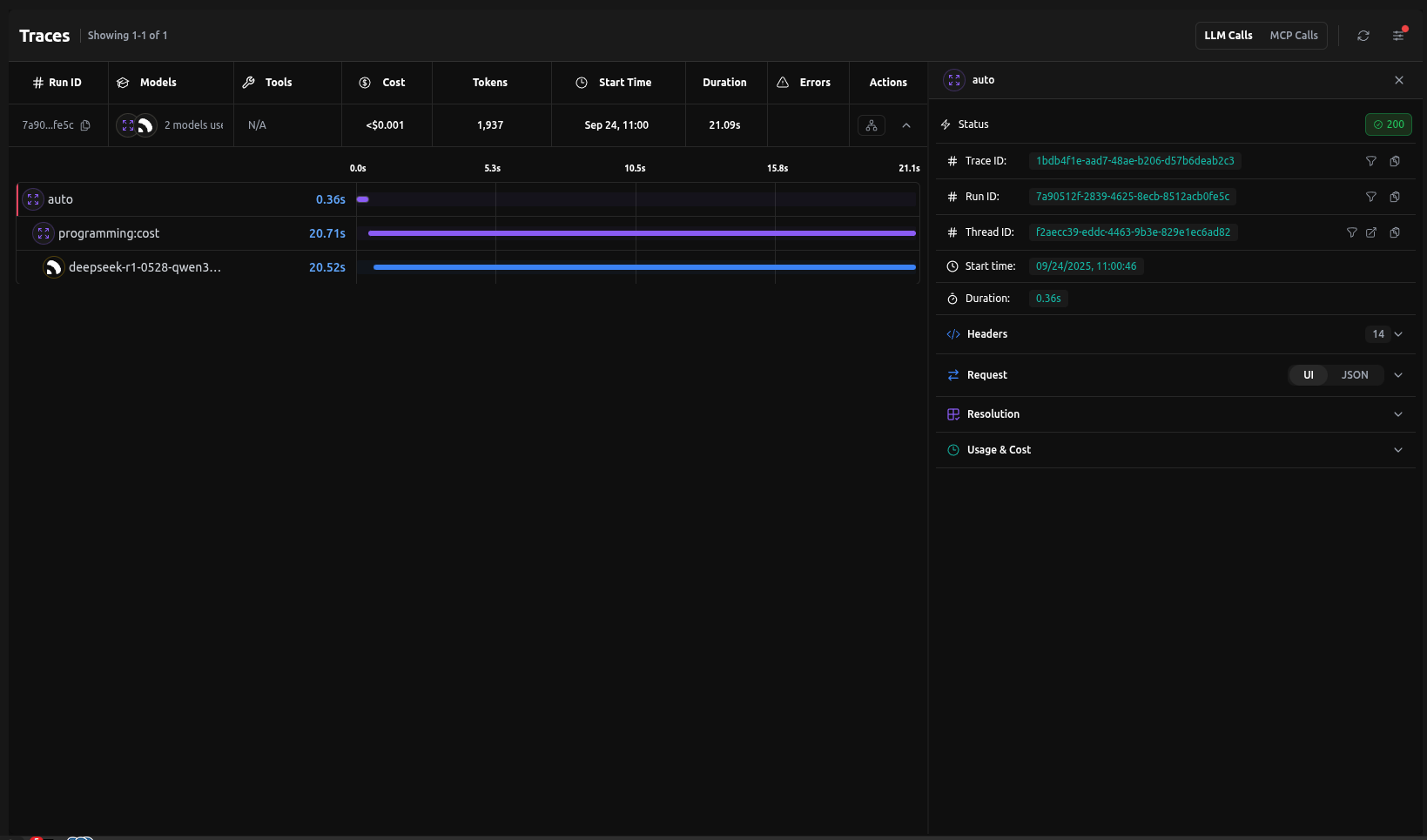
That's it — no config needed. The router classifies the query and picks the best model automatically.
If you already know the query type (e.g., Finance), skip auto-classification with
router/finance:accuracy.
Under the Hood
Behind the scenes, the Auto Router uses lightweight classifiers (NVIDIA for complexity, BART for topic) combined with LangDB's routing engine. These decisions are logged in traces so you can inspect why a query was sent to a specific model.
How It Works
The Auto Router uses a two-stage classification process:
- Complexity Classification: Uses NVIDIA's classification model to determine if a query is high or low complexity
- Topic Classification: Uses Facebook's BART Large model to identify the query's topic from these categories:
- Academia
- Finance
- Marketing
- Maths
- Programming
- Science
- Vision
- Writing
Based on these classifications and your chosen optimization strategy, the router automatically selects the best model from your available options.
Router Behavior
| Router Syntax | What happens |
|---|---|
router/auto | Classifies complexity + topic. Low-complexity queries go to cheaper models; high-complexity queries go to stronger models. Then applies your optimization strategy. |
router/auto:<mode> | Classifies topic only. Ignores complexity and always applies the chosen optimization (cost, accuracy, etc.) for that topic. |
router/<topic>:<mode> | Skips classification. Directly routes to the specified topic with the chosen optimization mode. |
Optimization Modes
| Mode | What it does | Best for |
|---|---|---|
balanced | Intelligently distributes requests across models for optimal performance | General apps (default) |
accuracy | Picks models with best benchmark scores | Research, compliance |
cost | Routes to cheapest viable model | Support chatbots, FAQs |
latency | Always picks the fastest | Real-time UIs, voice bots |
throughput | Distributes across many models | High-volume pipelines |
Case Study
Save costs without losing quality. Auto Router delivers best-model accuracy at a fraction of the price.
Auto Router delivers 83% satisfactory results at 35% lower cost than GPT-5. Real-world testing shows router optimization without quality compromise.
Use Cases
Cost Optimization
Perfect for FAQ bots, education apps, and high-volume content generation.
{
  "model": "router/auto:cost",
  "messages": [
    {
      "role": "user",
      "content": "What are your business hours?"
    }
  ]
}
Accuracy Optimization
Ideal for finance, medical, legal, and research applications.
{
  "model": "router/auto:accuracy",
  "messages": [
    {
      "role": "user",
      "content": "Analyze this financial risk assessment"
    }
  ]
}
Latency Optimization
Great for real-time assistants, voice bots, and interactive UIs.
{
  "model": "router/auto:latency",
  "messages": [
    {
      "role": "user",
      "content": "What's the weather like today?"
    }
  ]
}
Balanced (Load Balanced)
Intelligently distributes requests across available models for optimal performance. Works well for most business applications and integrations.
{
  "model": "router/auto",
  "messages": [
    {
      "role": "user",
      "content": "Help me write a product description"
    }
  ]
}
Direct Category Routing
If you already know your query belongs to a specific domain, you can skip classification and directly route to a topic with your chosen optimization mode.
{
  "model": "router/finance:accuracy",
  "messages": [
    {
      "role": "user",
      "content": "Analyze the risk factors in this financial derivative"
    }
  ]
}
Result:
- Skips complexity + topic classification
- Directly applies accuracy optimization for the finance topic
- Routes to the highest-scoring finance-optimized model
Available topic shortcuts:
router/finance:<mode>router/writing:<mode>router/academia:<mode>router/programming:<mode>router/science:<mode>router/vision:<mode>router/marketing:<mode>router/maths:<mode>
Where <mode> can be: balanced, accuracy, cost, latency, or throughput.
Quick Decision Guide:
- Don't know the type? → Use
router/auto - Know the type? → Jump straight with
router/<topic>:<mode>
Advanced Configuration
Topic-Specific Routing
{
  "model": "router/auto",
  "router": {
    "topic_routing": {
      "finance": "cost",
      "writing": "latency",
      "technical": "accuracy"
    }
  },
  "messages": [
    {
      "role": "user",
      "content": "Calculate the net present value of this investment"
    }
  ]
}
Best Practices
- Choose the Right Mode - Match optimization to your use case
- Monitor Performance - Use LangDB's analytics to track routing decisions
- Combine with Fallbacks - Add fallback models for high availability
- Test Different Modes - Experiment to find the best fit
Integration with Other Features
The Auto Router works seamlessly with:
- Guardrails - Apply content filtering before routing
- MCP Servers - Access external tools and data sources
- Response Caching - Cache responses for frequently asked questions
- Analytics - Track routing decisions and performance metrics