Working with MCPs
Instantly connect to managed MCP servers — skip the setup and start using fully managed MCPs with built-in authentication, seamless scalability, and full tracing. This guide gives you a quick walkthrough of how to get started with MCPs.
Quick Example
In this example, we'll create a Virtual MCP Server by combining Slack and Gmail MCPs — and then connect it to an MCP Client like Cursor for instant access inside your chats.
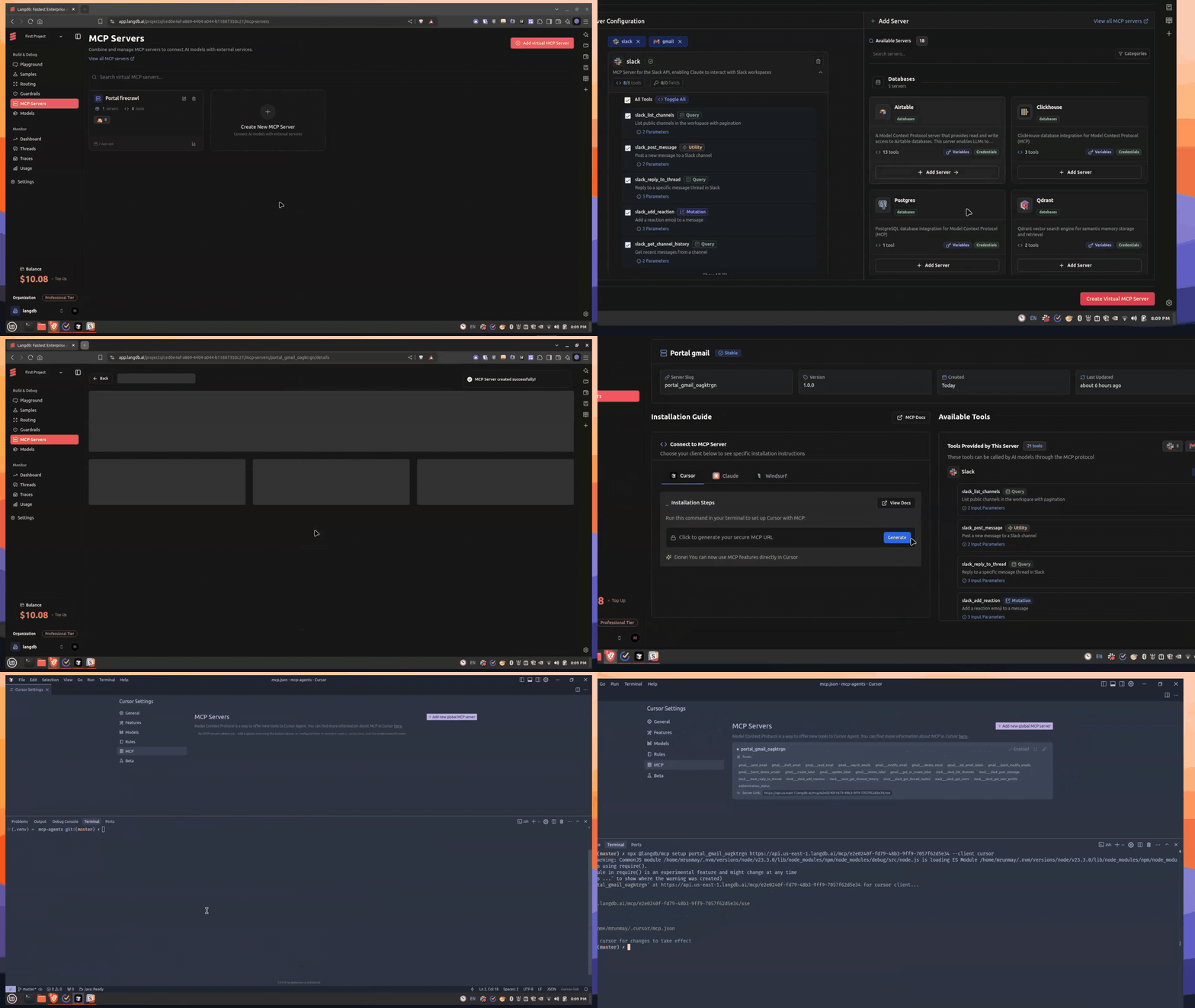
Steps:
- Select Slack and Gmail from MCP Severs in the Virtual MCP Section.
- Generate a Virtual MCP URL automatically.
- Install the MCP into Cursor with a single command.
Example install command:
npx @langdb/mcp setup slack_gmail_virtual https://api.langdb.ai/mcp/xxxxx --client cursor
What Happens Under the Hood?
- Authentication is handled (via OAuth or API Key)
- Full tracing and observability are available (inputs, outputs, errors, latencies)
- MCP tools are treated just like normal function calls inside LangDB
Next Steps:
- MCP Servers listed on LangDB: https://app.langdb.ai/mcp-servers
- Explore MCP Usecases.